Ep. 26: What is Vibe Coding?
|
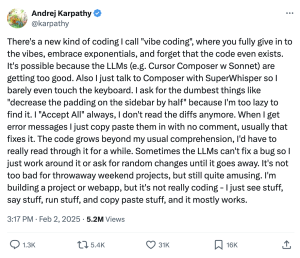
In this episode we talk about what vibe coding actually is, where the term came from, and why it’s showing up everywhere right now. I break down how vibe coding differs from AI-assisted coding, why the distinction matters, and what’s exciting and risky about both. The goal is to help you understand what’s real, what’s hype, and how to approach this space with curiosity instead of confusion. Why should you care? Honestly, you don’t need to care about anything. Truly. I’m sharing this because you, like me, might be curious and want some context for what’s floating around online. If you’re not curious about this stuff at all, that’s totally fine too! No judgment. I’ll catch you on the next episode. So… What Is Vibe Coding?Vibe coding is a term introduced by Andrej Karpathy in February of 2025. He’s a big name in the AI world, was a founding member at OpenAI (he left in 2024), and previously led Autopilot AI at Tesla. So yes, very smart dude.
In plain language, vibe coding is using large language models to build things like apps, projects, or software, without reviewing any of the code that gets written. You type natural language into the model, describe what you want, and it does the work for you. If that sounds too good to be true, it kind of is and kind of isn’t, and that tension is a big reason I wanted to do this episode. There are vibe coding tools being marketed directly to the public right now, most notably Lovable and Replit, where you describe the app and it builds everything. My guess is that as you read that you were likee, “Yeah right.”, and honestly, that’s the correct response in my opinion. These AI agents can execute, but what they create is exactly as fragile as you’d expect. You don’t know how it works, which means you can’t fix it if it breaks, and the biggest issue here is security. If you don’t know what the code is doing, you don’t know how data is being handled. That said, I do think it’s worth pausing for a moment to appreciate the fact that you can get a working prototype just by typing natural language. That part really is pretty dope. But, as is to be expected, it’s a lot like the early days of AI image generation: very little control over the output, what it generated wasn’t always right (sometimes it was very wrong), and changing one thing inevitably messed up something else. Now apply all of that to an app, and you can see how this gets problematic quickly. Vibe Coding vs AI-Assisted CodingThis is where definitions start to matter. The reason I led with Andrej Karpathy’s original definition is because we’re starting to see vibe coding get conflated with AI-assisted coding, and those two things are not the same. Vibe coding is exactly what it sounds like. You’re going off vibes. You don’t care about the code or how it works, just that it works, which can be great for prototyping and for shipping ideas quickly. A quick/cool aside, vibe coding is absolutely changing landscape for folks who used to pitch ideas with sketches or schematics. Now instead of saying “imagine this,” they can vibe code a working web app that someone can actually click around and try. Pretty cool. AI-assisted coding is different. With AI-assisted coding, AI still generates the code, but you’re checking it, asking questions, and building an understanding of the logic underneath what’s happening. You may not have written the code yourself, but you know what’s going on under the hood. I see vibe coding and AI-assisted coding as existing on a spectrum, and I’m currently living somewhere in the middle, which is honestly awesome and a big reason I wanted to do this episode in the first place; I want to start introducing you curious folks to this world. I don’t know how to code in the traditional sense, and I have zero desire to memorize syntax or rules, but I love problem solving, I love understanding logic, and I love figuring things out. And I know I’m not alone in that. AI is creating a whole new skillset for folks like us and bringing coding and web development to a new demographic. How I’d Recommend Approaching ItThe main thing I want you to take away from this episode is this: While vibe coding exists, if you’re curious and want to dabble, lean into AI-assisted coding. Yes, use natural language to have the model generate code for you, but ask it what that code means, ask why it’s doing what it’s doing, and tell it explicitly that you’re not a coder and that you want to understand what’s happening as you go. Have it teach you. Beyond curiosity, you might care about vibe coding because you want to create custom solutions to your own problems. Last episode I mentioned that I built a medication tracker web app for my sister. Does something like that already exist? Probably. But now it’s exactly what I want it to be. Perhaps that personalization and customization intrigues you. Maybe you want a time tracker. Maybe you want a custom dashboard for your training clients. Maybe you just want something that fits how your brain works. You can build these things. It won’t be simple, it will require tech tenacity (like…a lot), and I’m still going to advise against using publicly marketed vibe coding platforms like Lovable, but it is possible, and this is what I’m diving into for 2026. (Quick mid-episode CTA while we’re here: if you have an idea you want me to try building, hit me up. The best way to learn is to build, and I need use cases.) For those wondering what I used to build the app for my sister and the website for my brother, I’ve primarily been using Cursor, which is an AI-assisted code editor, along with ChatGPT. Claude Code is a big player right now, possibly the biggest, but I’m still working through Cursor, which means Claude Code remains on the to-do list. I’m keeping this list very superficial. If you want to nerd out, reach out. If you want to go a little deeper, I took a couple of courses while I was learning and found them genuinely helpful.
At some point I could see myself creating something around this, but not yet. I’m still verrrrrrrrry much in the learning phase. Big Picture Thoughts + SecurityZooming out, I think vibe coding is fucking awesome. I think AI-assisted coding is fucking awesome. Lowering the barrier to entry for coding and web development is genuinely so exciting to me. I’m not here to forecast what this means for jobs, because I think that’s mostly a waste of time. Humans adapt and no one can predict the future. What I do want to briefly address is the main concern I see come up, especially in the Threads space: Security. Specifically data breaches and exposure of sensitive information. If you’re looking to vibe code something you want to sell to the masses, my advice is simple: don’t. Security is real, and you’re probably going to mess it up. If you’re building something for yourself, the risk is infinitely smaller (basically zero), especially if you use an AI-assisted coding approach, ask questions as you go, and build slowly, one step at a time. I bring this up primarily for anyone who is thinking of entering this awesome space but is second-guessing themselves because of the loud critics. How I Used ChatGPT This WeekEach episode I include a section where I briefly talk about how I used ChatGPT that week. This week we’re talking about image creation. I spent the better part of last Friday creating featured images for every blog post on my ChatGPT Curious website. What I learned is that the best results came from having ChatGPT generate the image prompt text first, not the image itself, because it’s SO much easier to refine words than to wait for an image that’s completely wrong. The instructions live in my Project → I paste the Companion → Chat generates the image prompt text → and then asks me “approve or revise” → If I type “approve”, Chat generates the image, if I type “revise”, Chat revises the prompt It’s a nice little rinse and repeat process that I can now use every week. Da Wrap-upWhile this episode wasn’t directly about ChatGPT, hopefully you still got something out of it and see how vibe coding lowers the barrier to building, but AI-assisted coding is where curiosity, understanding, and real agency actually live. As always, endlessly appreciative for you and your curiosity. Catch you next Thursday. Maestro out. AI Disclaimer: In the spirit of transparency (if only we could get that from these tech companies), this email was generated with a very solid alley-oop from ChatGPT. I write super detailed outlines for every podcast episode (proof here), and then use ChatGPT to turn those into succinct, readable recaps that I lightly edit to produce these Curious Companions. Could I “write” it all by hand? Sure. Do I want to? Absolutely not. So instead, I let the robot do the work, so I can focus on the stuff that I actually enjoy doing and you get the content delivered to your digital doorstep, no Airpods required. High fives all around. |